Português
 Español
UTP vs STP vs FTP: Anatomy of Shielded Network Cables

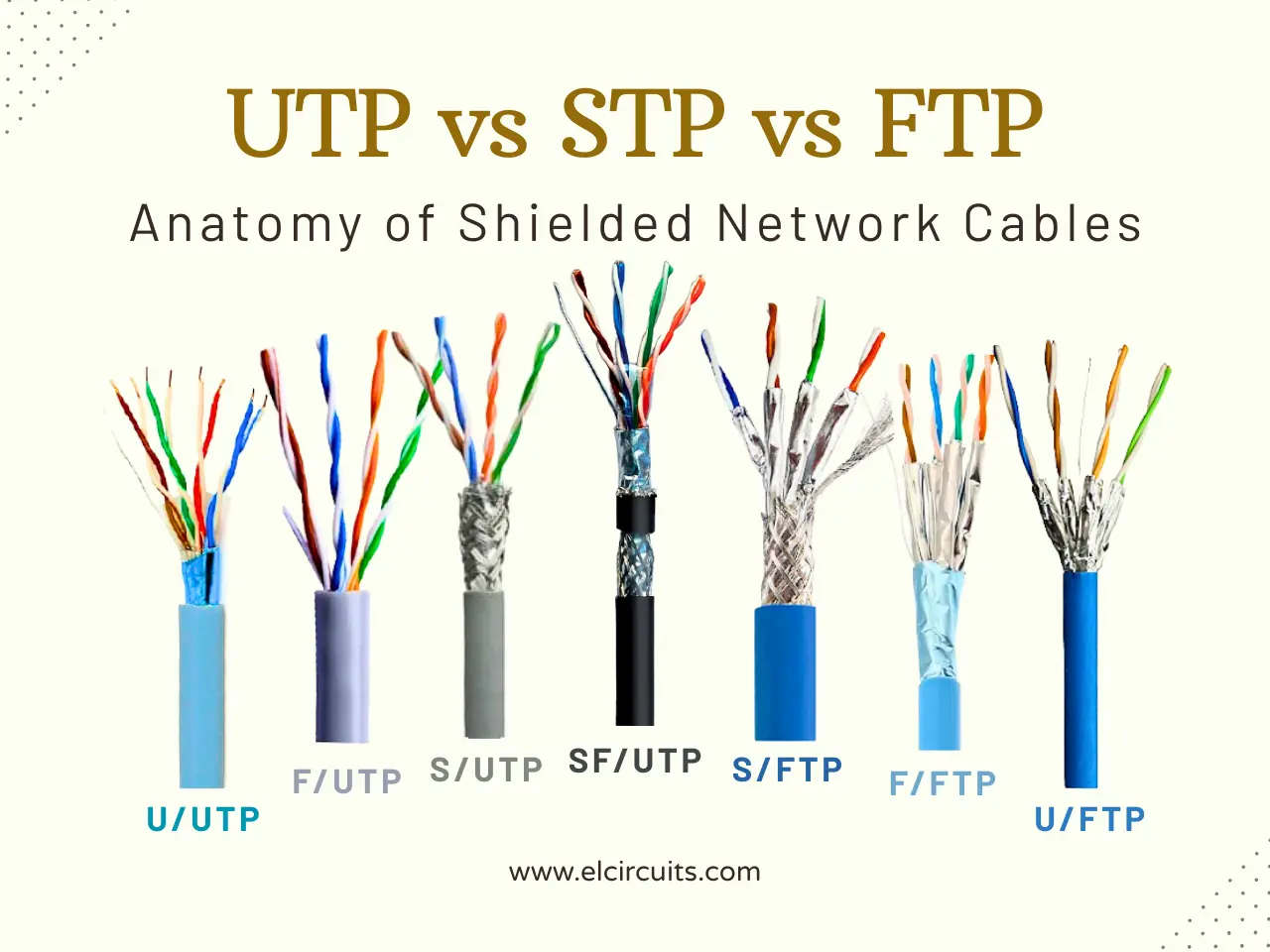
If you have ever faced mysterious connection drops or slowness in environments with many electrical cables, you know that a network cable is much more than just copper and plastic. Many installers and enthusiasts make the mistake of ignoring the physics behind data transmission, treating any 'blue cable' as equal.
Today, we will dissect the engineering behind the acronyms UTP, STP, and FTP, including the variations U, F, S, and SF. More than memorizing letters, you will understand how to protect your infrastructure against 'electromagnetic chaos' and ensure that the contracted speed is, in fact, the delivered speed.
1️⃣ The Theory Behind: Differential, Electromagnetism, and Grounding
To understand why network cables use different levels of protection and shielding, it is important to start with the physical basis of Ethernet operation. In modern networks (especially Gigabit Ethernet and above), transmission occurs via differential signals in twisted pairs.
In this method, the transmitter sends the same signal through two conductors, but with opposite polarities, usually represented as V+ and V−. The receiver does not measure each wire individually; instead, it interprets the voltage difference between the two conductors, known as the differential voltage:
Vdiff = (V+) - (V-)
This type of transmission offers great resistance to external interference. When an external electromagnetic field hits the cable, it tends to induce a voltage practically equal in both conductors. This phenomenon is called common-mode noise (common-mode noise). Since the receiver calculates only the difference between the signals, this noise is largely canceled.
The twisting of the pairs further reinforces this effect. By constantly alternating the physical position of the conductors along the cable, exposure to the external electromagnetic field is distributed evenly, improving the natural cancellation of interference.
However, in environments with high electromagnetic density, such as industrial installations, data centers, or locations with a strong presence of radio frequency (RFI), this passive cancellation may not be sufficient. In these scenarios, problems such as crosstalk (crosstalk) also arise, where the signal from one wire pair induces interference in an adjacent pair due to capacitive and inductive coupling between them.
This is the point where cable shielding becomes relevant. Metallic layers such as meshes or conductive foils function similarly to a Faraday cage, reducing the penetration of external electromagnetic fields and limiting coupling between internal pairs. When properly grounded, the shielding can also help drain common-mode currents, contributing to signal stability.
Another fundamental aspect in the performance of Ethernet cables is Characteristic Impedance (Z₀). For twisted pair cables used in Ethernet networks, the standard specified by structured cabling standards is:
Z₀ = 100 Ω ± 15%
In practice, this means that the cable impedance must remain approximately within the range of 85Ω to 115Ω throughout the entire link.
This impedance depends directly on the distributed electrical properties of the transmission line, mainly inductance (L) and capacitance (C) per unit length. In an ideal approximation, the relationship between these parameters is expressed by:
Z0 = √(L / C)
Any physical change in the cable can modify these parameters. Crushing, excessive bending, twisting, or deformations of the pair geometry alter the distance between conductors and the electromagnetic field around them. This changes the local impedance of the cable and can cause impedance discontinuities.
When this occurs, part of the signal energy does not move forward through the cable and is reflected back towards the transmitter. These reflections degrade signal integrity and can reduce the effective data rate, especially in high-speed networks such as Gigabit Ethernet and 10 Gigabit Ethernet.
For this reason, both the geometric design of the cable and the correct application of shielding and grounding are critical factors to ensure electromagnetic integrity and network communication performance.
2️⃣ The "Core": Deciphering the Acronyms in Practice
Now that we understand the physics, we need to standardize the vocabulary. Manufacturers use international acronyms that make up the cables, usually in the format "U/UTP". The first letter refers to the overall cable shield, and after the slash "/", it refers to the shielding of the internal pairs. Let's dissect each one visually.
Nomenclature Components
Before entering the full models, let's understand the basic letters:
- U - Unshielded (No Shielding)
- F - Foil Shielding (Aluminum Foil Shielding)
- S - Braided Shielding (Metal Mesh Shielding)
- SF - Braided + Foil Shielding (Double Shielding: Mesh and Foil)
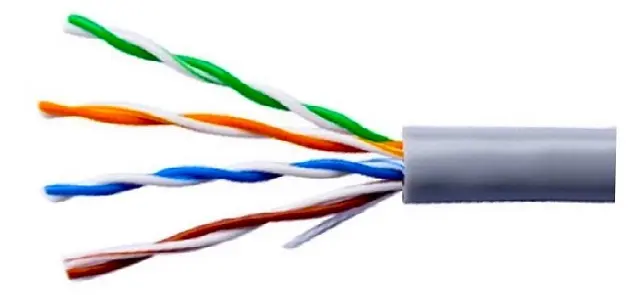
U/UTP - Unshielded / Unshielded Twisted Pair
- U - Unshielded
- UTP - Unshielded Twisted Pair
- The most common standard, with no shielding surrounding the cable or the pairs.
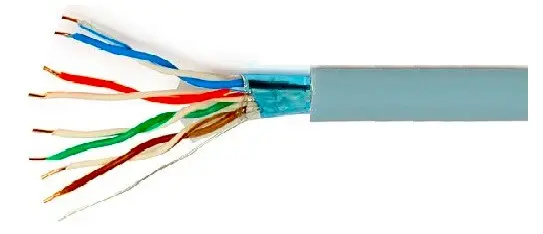
F/UTP - Foiled / Unshielded Twisted Pair
- F - Shielded with Aluminum Foil
- UTP - Unshielded Twisted Pair
- Has an aluminized foil surrounding the entire cable, but the internal pairs do not have individual shielding.
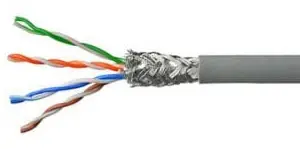
S/UTP - Braided Shielding / Unshielded Twisted Pair
- S - Shielded with Braid or Mesh
- UTP - Unshielded Twisted Pair
- Uses a metallic mesh (screen) to protect the entire cable, ideal against mechanical and low-frequency interference.
SF/UTP - Braided Shielding + Foil / Unshielded Twisted Pairs
- SF - Shielded with Mesh + Shielded with Aluminum Foil
- UTP - Unshielded Twisted Pair
- The combination of both shields (Mesh + Foil) surrounding the cable offers maximum external protection.
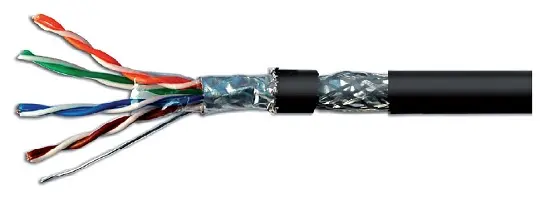
S/FTP - Braided Shielding / Foiled Twisted Pair
- S - Shielded with Mesh (Global)
- FTP - Shielded Twisted Pair (Individual)
- Here each pair is individually shielded (foil) and there is an external mesh. The ideal standard for heavy industry and data centers.
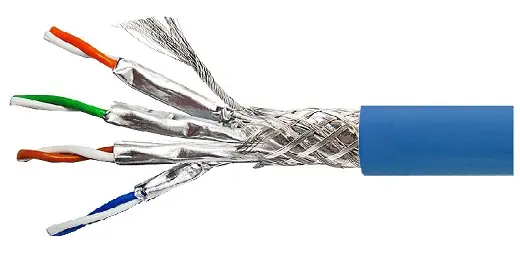
F/FTP - Foiled / Foiled Twisted Pair
- F - Shielded with Aluminum Foil (Global)
- FTP - Shielded Twisted Pair (Individual)
- Foil shielding surrounding the entire cable and foil on each pair. Common in Cat 6a cables to prevent Alien Crosstalk.
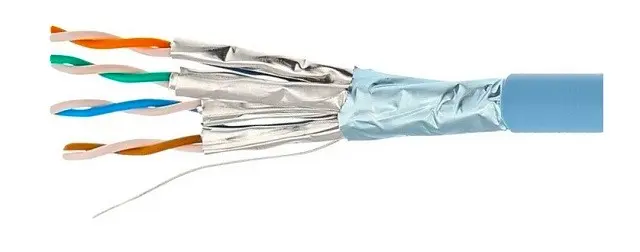
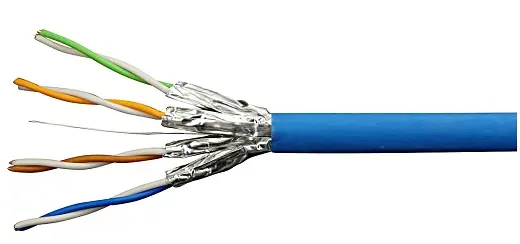
U/FTP - Unshielded / Foiled Twisted Pairs
- U - Unshielded (Global)
- FTP - Shielded Twisted Pair (Individual)
- There is no general protection on the cable, but each pair has its own foil shielding. Great for reducing internal crosstalk without the cost of global shielding.
3️⃣ Best Practices and Installation "Pro Tips"
Buying an expensive shielded cable does not guarantee performance. Installation is the weakest link. Here is what separates the amateur installer from the engineer:
1. Grounding is Mandatory (and critical): A shielded cable (FTP, STP, S/FTP) does not function as an antenna (which absorbs noise). If you do not ground the shielding correctly at both ends (at the patch panel and the RJ45 connector), it can act as an antenna, picking up noise and injecting it into the signal via capacitance. Use metallic connectors and patch panels and ensure that the drain wire makes continuous contact with the connector housing.
2. Bend Radius: Do not crush the cable. When bending excessively, you alter the twist pitch of the internal pairs and the distance between conductors, destroying the impedance balance. The rule of thumb is not to bend the cable in a radius smaller than 4 times the outer diameter of the cable for horizontal cables.
3. Stripping: When preparing the cable for crimping, do not remove more than 25mm of the outer jacket. If you strip too much and expose the twisted pairs without the protection of the shielding (in FTP/STP cables), you create a signal leakage point. The shielding needs to cover the signal as close as possible to the connector pin contact.
4. Beware of the Skin Effect: At high frequencies (Gigabit Ethernet), current tends to flow over the outer surface of the conductor. Therefore, braided shields (braid) are generally more effective than flat foils alone, as they offer more surface area to drain low-frequency interference.
🤔 Frequently Asked Questions (FAQ)
We clarify the main technical doubts about choosing and installing shielded network cables.
What is the real difference between STP and FTP? 🔽
The main difference lies in the scope of the shielding. FTP (Foiled Twisted Pair) has only an aluminum foil surrounding all pairs together (global shielding). STP, in its more technical definition (U/FTP), has an aluminum foil shielding each pair individually. STP is superior in preventing crosstalk (interference between pairs within the same cable), while FTP focuses on external interference.
Can I use FTP cable in a common home installation? 🔽
You can, but it is usually a waste of money and more work. UTP cables are certified for home environments and support Gigabit Ethernet perfectly. The benefit of FTP only appears if the cable passes very close to high-current power cables, motors, or transformers. Furthermore, if you do not ground the FTP correctly, it may perform worse than a UTP.
What happens if I don't ground the cable shield? 🔽
Floating shielding (ungrounded) acts as an antenna. It will capture electromagnetic noise from the environment and, due to the capacitive effect between the shielding and the internal pairs, can inject this noise directly into your data signal, causing CRC errors and packet retransmissions, drastically reducing network speed.
Can I mix UTP and FTP cables in the same network? 🔽
Yes, electrically they are compatible and will communicate. However, the segment using UTP will be the weak link in the chain. If you install a UTP cable in a noisy environment, it will introduce errors in that section. For an "end-to-end" link, the cable category (Cat5e, Cat6, etc.) must be the same, but the shielding can vary, keeping in mind that performance will be limited by the weakest link (the least shielded).
What is the drain wire? 🔽
It is a copper wire (usually bare or tinned) placed in electrical contact with the shielding aluminum foil. Since aluminum is difficult to solder and has high contact resistance in compression connectors, the drain wire serves as the low-impedance conductive path to connect the shielding to the ground of the RJ45 connector or patch panel.
🎓 Conclusion
I hope this technical analysis with real images has cleared the fog surrounding the acronyms. Next time you crimp a connector, remember: the quality of the connection depends on physics, not just following wire colors.
✨ Our Gratitude and Next Steps
We sincerely hope this guide has been useful and enriching for your projects! Thank you for dedicating your time to this content.
Your Feedback is Invaluable:
Have any questions, suggestions, or corrections? Feel free to share them in the comments below! Your contribution helps us refine this content for the entire ElCircuits community.
If you found this guide helpful, share the knowledge!
🔗 Share This GuideBest regards,
The ElCircuits Team ⚡