
 Português
 Español
12V Automatic Battery Charger with UA741 IC: Complete DIY Guide with PCB Layout

Hello, electronics enthusiasts!
Today we're going to dive into the fascinating world of automatic battery charging circuits. We'll present a 13.8V automatic battery charger that supports a current of approximately 4A, perfect for your applications that need intelligent charging without constant supervision.
Imagine having a circuit that takes care of your battery like a true "electronic babysitter", activating charging only when necessary and automatically turning off when it reaches the ideal charge. This not only prevents damage and extends your battery's life but also opens up a universe of possibilities for autonomous projects!
In this complete guide, we'll explore every component and function of this smart charger, explaining in a clear and didactic way how it works, how to assemble it, and how to apply it in your creations. Whether you're a student, professional, or hobbyist, this project will expand your knowledge and capabilities in the world of electronics.
🤷 How Does the Automatic Charger Work?
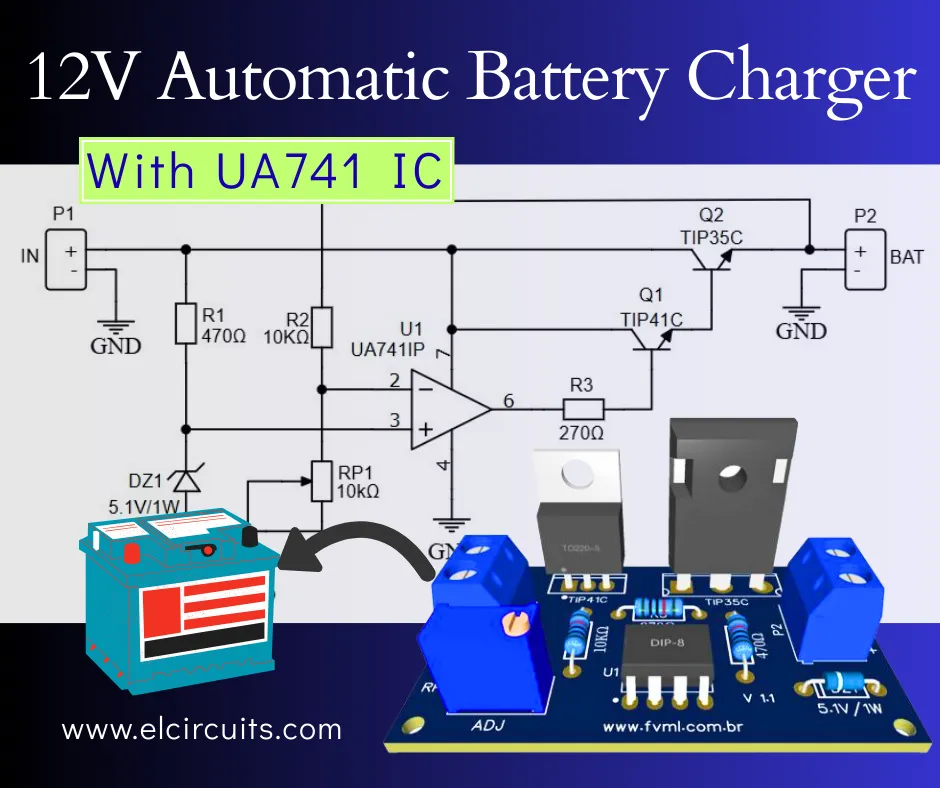
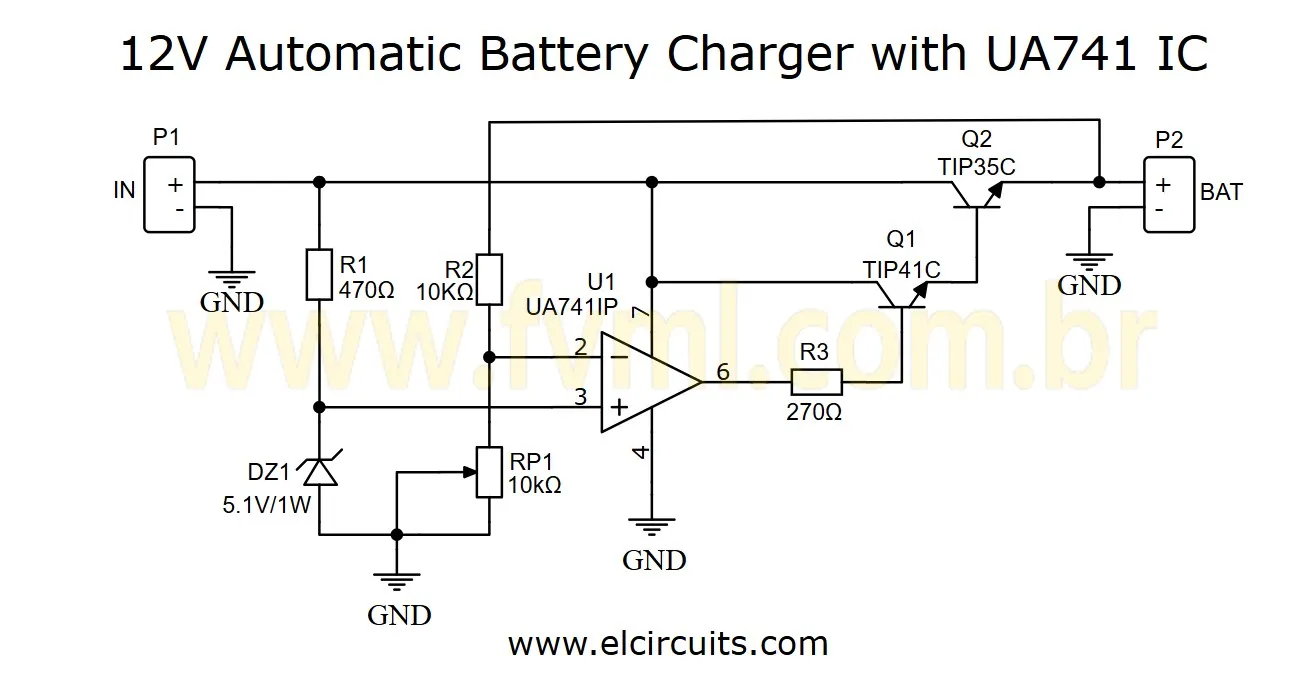
The secret to this charger lies in the UA741 operational amplifier, which acts as a precision voltage comparator. Think of it as the "brain" of our circuit, constantly monitoring the battery's voltage level to decide when it's time to charge and when it should stop.
At the Non-Inverting input of the UA741, we have a stable reference voltage of 5.1V, obtained through the 5.1V Zener diode in series with the 470Ω resistor R1. This voltage serves as our "zero marker", a reliable reference point for comparisons.
Meanwhile, at the Inverting input, we have an adjustable voltage (set by P1) that allows us to configure different cutoff points: 12.6V, 13.8V, 14.4V or any other value within the operating range. This is where we customize our charger for different types of batteries: Lithium, Lead-acid, Nickel Cadmium, among others.
The circuit works in a very intelligent way: when the battery voltage drops below the value programmed in P1, the operational amplifier "wakes up" and, through resistor R3 (which acts as a current limiter), triggers transistor Q2. This, in turn, functions as a driver for the power transistor Q1, which effectively initiates the charging process. When the battery reaches the desired voltage, the process reverses and charging is automatically interrupted.
🔌 Circuit Schematic Diagram
This simple yet effective architecture allows creating a completely autonomous charging system, ideal for applications such as:
- Home alarm systems
- UPS power supplies
- Off-grid solar power systems
- Electric vehicles and electric bicycles
- Emergency lighting systems
⚡ Power Supply Requirements
For this automatic charger to work effectively, the choice of power supply is critical due to the natural voltage drops of the components (approximately 3V total loss between the IC and the transistors):
Transformer Voltage: It is mandatory to use a transformer with an output between 15Vac and 18Vac.
Current Capacity: Minimum of 4 Amps to ensure a stable load.
Why not use 12Vac? A 12Vac transformer, after rectification and filtering, does not provide enough voltage to overcome the barrier of the transistors and still deliver the 14.4V required for a full battery charge . If you use 12V at the input, the battery will be permanently undercharged, ignoring the trimpot adjustment.
Final DC Voltage: After rectification (diode bridge and capacitors), the input voltage to the circuit (P1) should ideally be between 18V and 22Vdc.
Teacher's tip: To ensure maximum efficiency and durability of your charger, it's recommended to use a transformer with capacity margin (at least 20% above what's needed) and install adequate heat sinks on transistors Q1 and Q2, especially if you plan to use the circuit continuously or in high temperature environments.
📝 Component List
Here's everything you need to build your automatic charger:
- U1 - UA741 Operational Amplifier
- Q1 - TIP41C Transistor
- Q2 - TIP35C Power Transistor
- DZ1 - 5.1V 1W Zener Diode
- R1 - 1/8W 470Ω Resistor (yellow, violet, black)
- R2 - 1/8W 10 KΩ Resistor (brown, black, orange)
- R3 - 1/8W 270 Ω Resistor (red, violet, black)
- P1 - 10 KΩ Trimmer (can be replaced by a potentiometer for external adjustment)
- Miscellaneous - Heat sinks for Q1 and Q2, wires, solder, printed circuit board, etc.
⛏️ Step-by-Step Assembly
The assembly of this circuit is relatively simple, but requires attention to details. Follow these steps to ensure success:
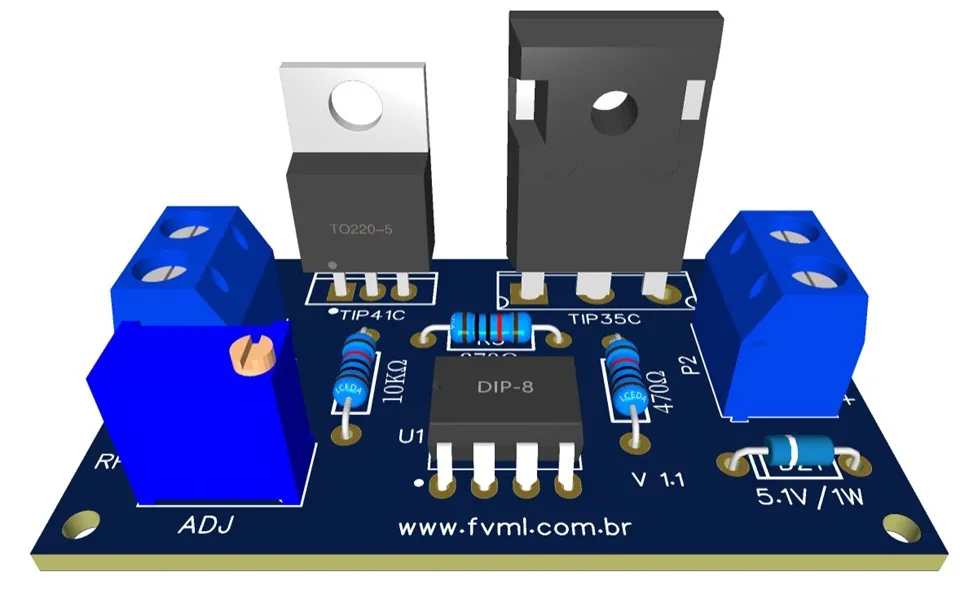
- Start by soldering the smaller components (resistors, zener diode) on the printed circuit board.
- Next, install the socket for the UA741 IC (recommended to facilitate possible replacements).
- Install transistors Q1 and Q2, already with their respective heat sinks.
- Connect the trimmer P1 (or external potentiometer, if you prefer).
- Check all connections and solder joints before powering the circuit.
- For the first test, use a variable power supply to simulate a battery and adjust P1 to the desired cutoff point.
- After initial tests, connect a real battery and verify the complete functioning of the system.
Attention: Always observe polarity when connecting the battery! A polarity reversal can permanently damage the circuit components. Consider adding a protection diode in series with the charging output to prevent accidents.
🔩 Applications and Possibilities
This automatic charger is extremely versatile and can be adapted for various applications. Besides its direct use as a 12V battery charger, you can:
- Integrate it into solar power systems to keep backup batteries always charged
- Use it in alarm or surveillance systems that need to work even during power outages
- Adapt it to charge batteries of different voltages by modifying some components
- Implement it in electric vehicles or electric bicycles as part of the battery management system
- Create an uninterruptible power supply (UPS) for critical equipment
💎 Maintenance and Troubleshooting Tips
Even a well-designed circuit can present problems. Here are some tips to identify and resolve the most common issues:
- Battery doesn't charge: Check if the power supply is providing the correct voltage and if the fuses (if any) are intact.
- Charging doesn't stop: Possibly the trimmer P1 is misadjusted or the UA741 IC is defective. Also check if the voltage divider is working correctly.
- Transistors overheat: Check if the heat sinks are correctly installed and if there is adequate thermal paste. Consider using fans for high current applications.
- Unstable cutoff voltage: Can be caused by poor contact in the trimmer or by electrical interference. Consider adding a filter capacitor at the reference input of the IC.
💡 Ideas for Your Next Project
Did you like this project? Then you'll love exploring other circuits we've prepared. Each with its particularities and ideal applications!
- 12V Automatic Lead Acid Battery Charger Using LM350 IC with PCB
- 3.7V Li-Ion Battery Charger Circuit using MCP73831 IC + PCB
- Simple 12V battery charger with automatic charging indicator + PCB
- Lithium (Li-Ion) Battery Charger using LP2951 IC + PCB
- How To Make Rechargeable Emergency LED Light Using LM350 IC with PCB
- USB 5V 4A Car Charger using 78S05 with PCB
🖨️ Printed Circuit Board (PCB)
To make your life easier, we've made the PCB - Printed Circuit Board files available. The files are in GERBER, PDF, and PNG formats, covering all your needs, whether for homemade assembly or for sending to a professional fabrication.
And best of all: the files are available for free download directly from the MEGA server, through a direct link, without any complication or redirection!
📥 Direct Download Link
To download the necessary files for assembling the electronic circuit, simply click on the direct link provided below:
Download Link: PCB Layout, PDF, GERBER, JPG
🤔 Frequently Asked Questions (FAQ)
To ensure your project is a success, we've compiled some of the most common questions about this topic. Check them out!
Can I use this charger for lithium batteries? 🔽
Yes, it's possible to use this circuit for lithium batteries, but with some important precautions. Lithium batteries require more precise voltage and current control, as well as overcharge protection systems. It's recommended to adjust the cutoff voltage to 4.2V per cell (12.6V for a 3-cell series battery) and consider adding a balancing circuit to ensure all cells charge equally.
What is the maximum current this circuit can provide? 🔽
The circuit was designed to provide up to approximately 4A, but this capacity depends on several factors: the power supply capacity, the size of the heat sinks on the transistors, and the quality of the components used. For higher currents, you'll need larger heat sinks and possibly forced fans. You may also consider replacing the transistors with higher capacity models.
Is it possible to add an LED indicator to show when the battery is charging? 🔽
Yes! You can easily add indicator LEDs. A green LED can be connected to the output of the operational amplifier (through a current-limiting resistor) to indicate when the battery is charging, and a red LED can indicate when charging is complete. You can also add an ammeter to monitor the charging current in real time.
Can I modify this circuit to charge 24V batteries? 🔽
Yes, it's possible to adapt this circuit for 24V batteries, but some important modifications will be necessary. You will need to: 1) Use a power supply of at least 28-30V; 2) Possibly replace the transistors with models with higher breakdown voltage; 3) Modify the voltage divider to adjust the operating range; 4) Check if the UA741 IC supports the necessary supply voltage. In some cases, it may be more practical to use a specific circuit for 24V batteries.
🎓 Conclusion
This automatic battery charger with UA741 IC is a versatile, educational, and extremely useful project for any electronics enthusiast. Besides its practical application as a charger, it teaches us important concepts about voltage control, using operational amplifiers as comparators, and energy management.
By building this circuit, you not only create a useful tool for your applications but also expand your knowledge and skills in electronics. Feel free to experiment, modify, and adapt this project to your specific needs. Electronics is a creative field where practical learning is fundamental!
✨ Our Gratitude and Next Steps
We sincerely hope this guide has been useful and enriching for your projects! Thank you for dedicating your time to this content.
Your Feedback is Invaluable:
Have any questions, suggestions, or corrections? Feel free to share them in the comments below! Your contribution helps us refine this content for the entire ElCircuits community.
If you found this guide helpful, spread the knowledge!
🔗 Share This GuideBest regards,
The ElCircuits Team ⚡
Hello. With all due respect. I built three circuits using your topologies. None of them worked as expected. Is there some secret?
Hello Pavel!I’m sorry to hear that the previous builds didn’t work out as expected.
Electronics can be tricky, and sometimes the smallest detail makes all the difference! Let’s try to figure this out together.
What input voltage are you using in your setup?Technically, this circuit has an internal voltage drop of approximately 2.5V to 3V due to the transistor configuration and the operational limits of the UA741.
If you are using a 12V source at the input, the battery will unfortunately never reach a full charge. To overcome this ‘barrier’, you really need at least 16V to 18V DC at the input (P1).
Also, please make sure your TIP35C is mounted on a large heatsink, as it can get quite hot during the process.If you could share the specs of your power supply or a photo of your build, I’d be happy to take a closer look for you.
We’ll get it working!
Best regards!
Sorry. I didn’t specify which 3 power supply circuits.
Hello Pavel!I’m sorry to hear that the previous builds didn’t work out as expected.
Electronics can be tricky, and sometimes the smallest detail makes all the difference! Let’s try to figure this out together.
What input voltage are you using in your setup?Technically, this circuit has an internal voltage drop of approximately 2.5V to 3V due to the transistor configuration and the operational limits of the UA741.
If you are using a 12V source at the input, the battery will unfortunately never reach a full charge. To overcome this ‘barrier’, you really need at least 16V to 18V DC at the input (P1).
Also, please make sure your TIP35C is mounted on a large heatsink, as it can get quite hot during the process.If you could share the specs of your power supply or a photo of your build, I’d be happy to take a closer look for you.
We’ll get it working!
Best regards!