Português
 Español
Compact 80W Audio Amplifier with TDA7294 – Complete Guide + FREE PCB Layout


Compact 80W Sound Amplifier with TDA7294 + PCB
Hello everyone!
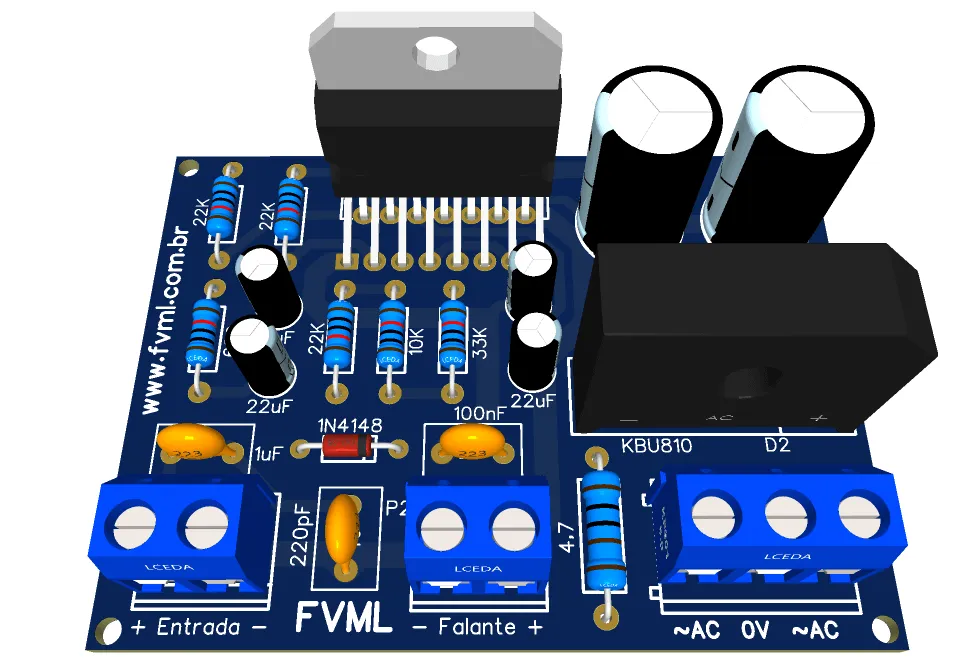
In today's post, we'll build a Compact 80W Sound Amplifier using the well-known TDA7294 integrated circuit. The differential feature of this amplifier is that it's quite compact, with its printed circuit board measuring only 6.2 × 4.5 cm.
Despite being very compact, the amplifier is powered by an external symmetrical transformer, and you only need to connect it to the board, as it already comes with integrated rectification.
📋 TDA7294 Description
The TDA7294 is a monolithic integrated circuit in the Multiwatt15 package, intended for use as a Class AB audio amplifier in Hi-Fi field applications (Mini-System, Amplified Box, Speaker Box), with 15 Pins as shown in Figure 2 below.

Thanks to the wide voltage range and high output current capability, it can deliver high power into 4 Ω and 8 Ω loads. The integrated mute function with turn-on delay simplifies remote operation, avoiding turn-on and turn-off noises.
🛠️ Features
- Wide supply voltage range (± 10V to ± 40V)
- DMOS output amplification stage
- High Output Power (Up to 100W Musical)
- Mute and Stand-by functions
- Very low harmonic distortion
- Short circuit protection
- Thermal protection with automatic shutdown
🔧 Circuit Operation
As the circuit is composed of an Integrated Circuit, the external components are added to adjust the operation of the circuit. Therefore, we will address the main components that make up the amplifier circuit, with the most relevant information to better understand the stages of its operation:
- R1 — Resistor that establishes the input impedance, we used a 22K one. If you use a larger one, you will increase the input impedance; if you decrease it, you will decrease the input impedance.
- R2 and R3 — These are feedback resistors, adjusted for a gain of 30dB. Both work in opposition: for R2, the higher the resistance, the lower the gain, and the lower the resistance, the higher the gain. In the case of R3, it works inversely proportional. Remember that they are optimized to avoid the so-called POP when turning the amplifier on and off.
- R4 — Resistor that determines the Stand-By time constant. If you decrease the resistance, POP noises may occur.
- R5, R6 and D1 — Set of components that determine the Mute time constant. If the resistance is decreased, the Mute time will be longer; if the resistance is increased, the Mute time will be shorter.
- R7 — Resistor responsible for stability and frequency control in the Output Speaker, working in series with C11.
- C1 — DC decoupling capacitors. We used 1uF. You can change this value to whatever you prefer, knowing that the higher the capacitor value, the greater the cut in high frequencies and the greater the gain in low frequencies.
- C2 — Spurious high-frequency filter capacitor.
- C3 — DC decoupling capacitor of the feedback. This works together with resistors R2 and R3. Technically, it has the same function as C1, however, it works for the feedback.
- C4 — Bootstrapping capacitor. The higher the capacitance of this capacitor, the more signal degradation will occur at low frequencies.
- C5 — Capacitor responsible for the Mute time constant. If you increase the capacitance, the Mute activation time will be shorter; if you decrease the capacitance, the time will be longer.
- C6 — Capacitor responsible for the Stand-By time constant. If you increase the capacitance, the Stand-By activation time will be shorter; if you decrease the capacitance, the time will be longer.
- C7, C8, C9, C10 — Capacitors responsible for attenuating Ripple voltages and filtering frequencies from the power grid.
- C11 — Capacitor responsible for stability and frequency control in the Output Speaker, working in series with R7.
🔌 Circuit Schematic Diagram!
The schematic diagram layout is shown below in Figure 3. It's a simple circuit to assemble, however, it requires basic to advanced technical skills and knowledge. If you don't have experience in assembly, ask someone with more experience to assemble it with you.
💡 Fresh Ideas for Your Next Project
Did you enjoy this project? Then you'll love exploring other circuits we've prepared. Each one with its unique features and ideal applications!
- Build a HI-FI 68W Audio Amplifier with LM3886T - DIY PCB Project
- 170W Bridge Power 40W Stereo 14.4V Car Audio Power Amplifier using TDA8560Q IC + PCB
- 14V 4 Channel 200W MOSFET Quad Bridge Power Amplifier using TDA7850 with PCBB
- 14.4V, 70W High Efficiency Power Amplifier using TDA1562Q IC + PCB
- 170W Bridge Power Amplifier with TDA7294 IC + PCB: High Performance in Audio!
- HI-FI 120W RMS Amplifier Circuit using LM4780 IC + PCB
- High Fidelity 14W - 12V Power Amplifier using TDA2030 IC + PCB
- 24W Stereo Hi-Fi Audio Amplifier using TDA2616 + PCB
🧾 Bill of Materials
- Semiconductors
- IC 1 ................ Integrated Circuit TDA7294
- D1 .................. Silicon Diode 1N4148
-
D2 .................. Diode Bridge KBU810
- Resistors
- R1, R2, R4 ..... Resistor 22K (red, red, orange, gold)
- R3 .................. Resistor 680Ω (blue, gray, brown, gold)
- R5 .................. Resistor 33K (orange, orange, orange, gold)
- R6 .................. Resistor 10K (brown, black, orange, gold)
-
R7 .................. Resistor 4.7Ω / 1W (yellow, violet, gold, gold)
- Capacitors
- C1 .................... Electrolytic capacitor 1μF / 50v
- C2 .................... Ceramic/Polyester capacitor 100pF
- C3, C4 ............. Electrolytic capacitor 22μF / 50V
- C5, C6 ............. Electrolytic capacitor 10μF /50V
- C7, C8 ............. Electrolytic capacitor 2200μF / 50V
-
C9, C10, C11 ... Ceramic/Polyester capacitor
100nF
- Miscellaneous
- P1, P2 ..... Connector WJ2EDGVC-5.08-2P
- P3 ........... Connector WJ2EDGVC-5.08-3P
-
Others .... Printed Circuit Board, solder, wires, etc.
⚡ Power Supply
- Vac = Vcc / √2, As √2 = 1.414, then
- Vac = Vcc / 1.414
- Vac = 30 / 1.414
- Vac = 21.216Vac
- Vac = Vcc / √2, As √2 = 1.414, then
- Vac = Vcc / 1.414
- Vac = 38 / 1.414
- Vac = 26.87Vac
🖨️ Printed Circuit Board (PCB)
We are making available for Download all the necessary materials for those who want to assemble with the suggested board: files in webp, PDF for home printing and Gerber files for those who want to send for professional manufacturing.
📥 Direct Link to Download
To download the necessary files for assembling the electronic circuit, just click on the direct link provided below:
Download Link: PCB Layout, PDF, GERBER, JPG
✨ Our Gratitude and Next Steps
We sincerely hope this guide has been useful and enriching for your projects! Thank you for dedicating your time to this content.
Your Feedback is Invaluable:
Have any questions, suggestions, or corrections? Feel free to share them in the comments below! Your contribution helps us refine this content for the entire ElCircuits community.
If you found this guide helpful, spread the knowledge!
🔗 Share This GuideBest regards,
The ElCircuits Team ⚡