
 Português
 Español
3-Band Passive Equalizer: Complete DIY Project Guide + PCB

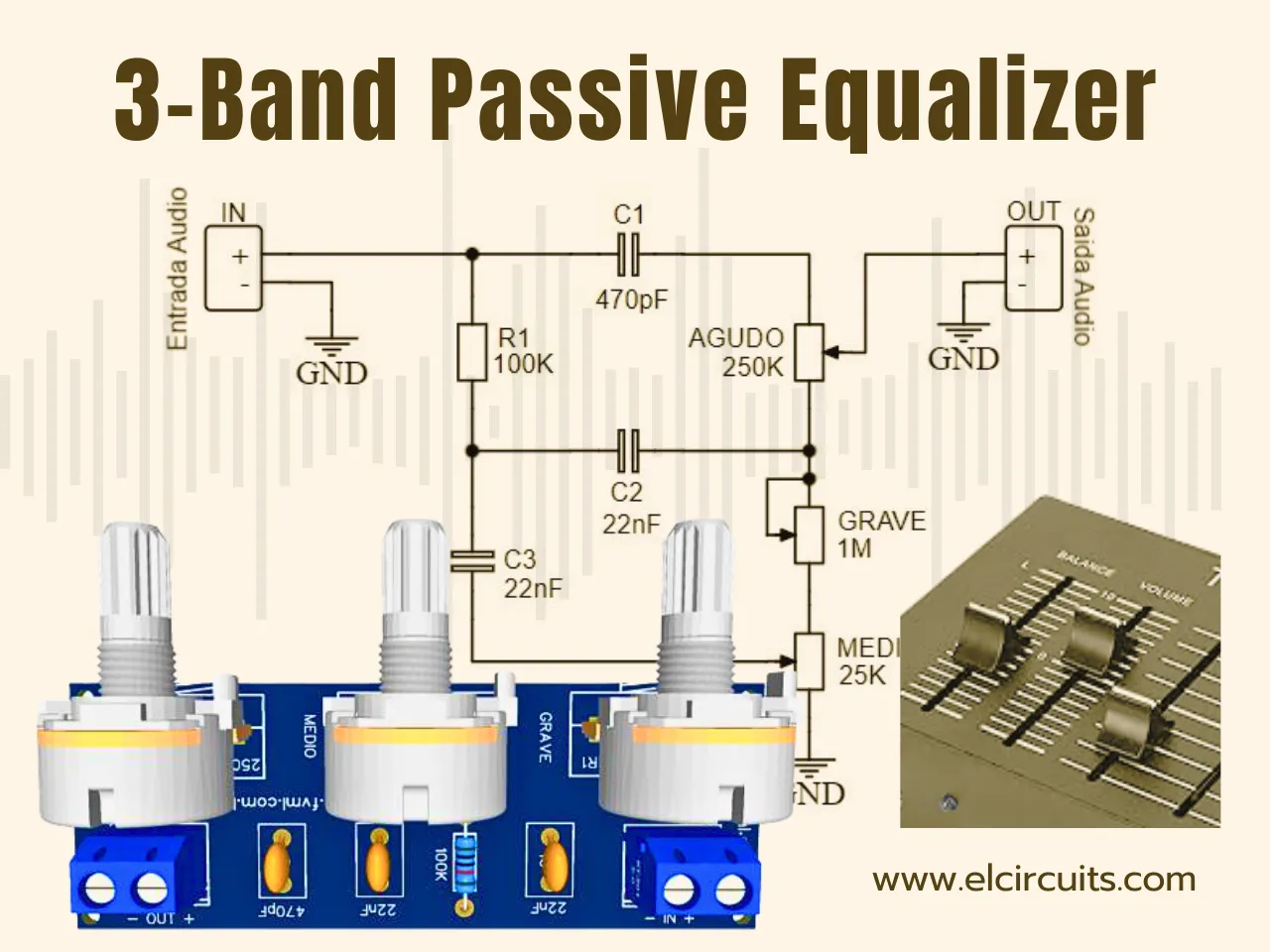
Hello, electronics enthusiasts and audio lovers!
Today we're going to dive into the fascinating world of audio equalizers with a practical and versatile project: a 3-band passive equalizer that will give you total control over the bass, midrange, and treble frequencies of your audio. This circuit, despite its simplicity, is the backbone of many professional audio equipment that you've probably already admired!
Imagine being able to adjust the sound of your audio system with the same precision as sound engineers in professional studios. This passive equalizer offers exactly that possibility, using basic electronic components to divide and control sound frequencies. Think of it as a conductor who directs different sections of an orchestra (bass, midrange, and treble) to create the perfect harmony.
🎵 What is a Passive Equalizer and Why Do You Need One?
A passive equalizer is essentially a set of filters that divide the audio frequencies into different bands, allowing you to adjust individually the volume of each frequency range. Unlike active equalizers, passive ones don't add gain to the signal - they only attenuate or allow the passage of certain frequencies.
This type of circuit is widely used in high-fidelity equipment, such as mixing consoles, active cabinets for guitars, acoustic guitars, keyboards and bass guitars. Major brands like Fender, Marshall and Bogner use similar principles in their renowned equipment, which demonstrates the effectiveness and versatility of this approach.
The beauty of this project lies in its simplicity and effectiveness. With just a few basic electronic components, you can build a device that will radically transform your audio experience, allowing you to customize the sound according to your preferences or the acoustic characteristics of the environment.
🤷 How Does the 3-Band Passive Equalizer Work?
The heart of this circuit is a set of three filters that operate in different frequency ranges:
- Low-pass filter for bass (low frequencies)
- Band-pass filter for midrange (intermediate frequencies)
- High-pass filter for treble (high frequencies)
Each potentiometer (P1, P2, and P3) acts as an attenuation control for its respective frequency range. When you adjust one of these controls, you're essentially determining how much of that frequency range will be "cut" from the original signal. It's like having three different faucets controlling the flow of different parts of the sound river!
An important characteristic of passive equalizers is that they don't add gain to the signal - they only selectively reduce certain frequencies. This means that to increase the perception of a specific range (like bass), you're actually reducing the other ranges, making the desired range stand out more.
🔌 Circuit Schematic Diagram
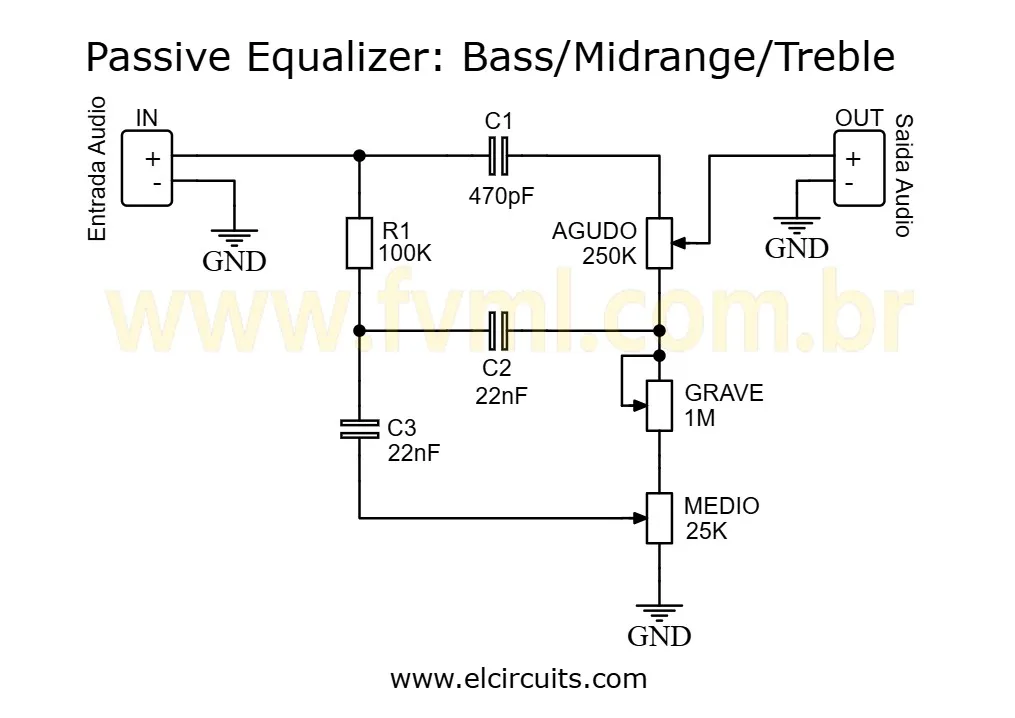
In Figure 2 below, we present the complete schematic diagram of our 3-band passive equalizer. As you can see, it's a circuit elegant in its simplicity, but powerful in its functionality. The component layout has been carefully designed to ensure a smooth frequency response and intuitive controls.
💡 Teacher's Tip:
When analyzing the diagram, note how the capacitors (C1, C2, and C3) in combination with the potentiometers create the different cutoff frequencies. The values of these components have been carefully calculated to divide the audible spectrum into three ranges that provide musical and intuitive control of the sound.
🛠️ Component List
To build this equalizer, you will need the following components. We recommend using quality components to ensure the best possible performance of your circuit:
- P1 - 250KΩ potentiometer (bass control)
- P2 - 1MΩ potentiometer (midrange control)
- P3 - 25KΩ potentiometer (treble control)
- R1 - 100kΩ resistor
- C1 - 470pF mica capacitor
- C2, C3 - 22nF mica capacitors
- Connector 1, 2 - Screw terminals (Block: 2-Pin, 5 mm)
- Others - Wires, solder, plugs, etc.
⚠️ Note on Components:
The quality of the potentiometers and capacitors can significantly affect the performance of your equalizer. Quality potentiometers ensure a smooth and consistent adjustment, while mica capacitors offer greater stability and less signal loss.
🎛️ Applications and Possibilities
This 3-band passive equalizer can be incorporated into various projects and audio equipment. Some popular applications include:
- Pre-amplifiers to add tonal control before the amplification stage
- Effect pedals for guitar or other musical instruments
- Home audio systems to compensate for acoustic characteristics of the environment
- Active speaker cabinets allowing fine adjustment of the frequency response
- Audio interfaces for recording or playback
🖨️ Printed Circuit Board (PCB)
To facilitate your assembly, we have made available the files for the Printed Circuit Board (PCB) designed specifically for this equalizer. The PCB has been carefully planned to minimize interference and ensure maximum signal quality.
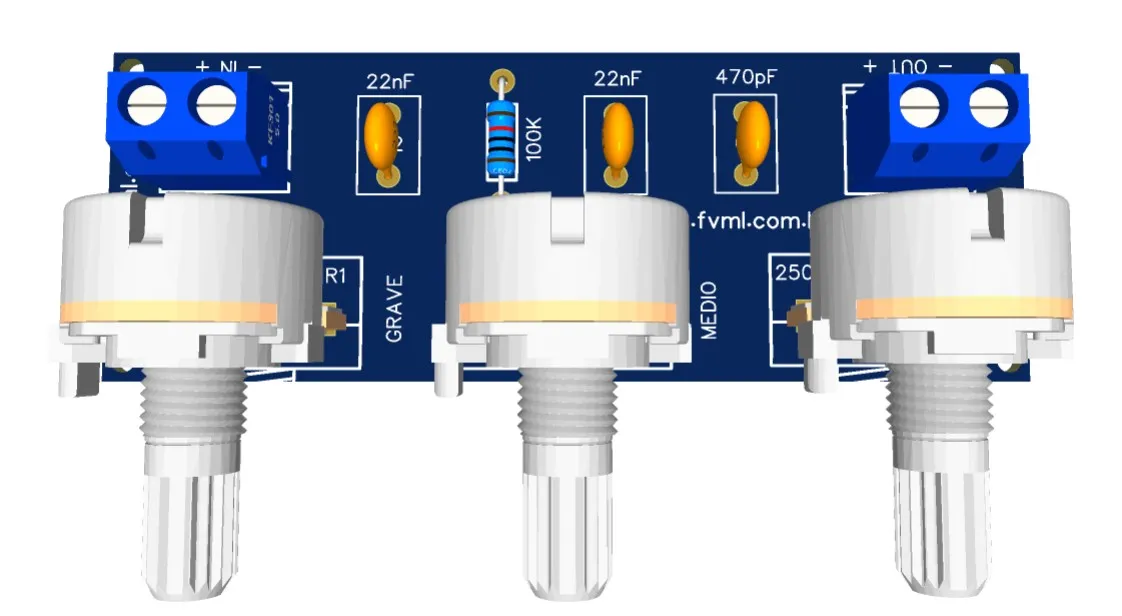
The files are available in GERBER, PDF, and PNG formats, covering all your needs, whether for a homemade assembly or to send to a professional fabrication. The PCB layout follows the best practices of audio circuit design, with properly dimensioned tracks and strategic positioning of components.
📥 Direct Download Link
To download the necessary files for assembling the electronic circuit, just click on the direct link provided below:
🔧 Step-by-Step Assembly Guide
To ensure the success of your project, we have prepared a simplified assembly guide. Follow these steps carefully:
- Check all components before starting, ensuring that you have everything you need and that the values are correct.
- Prepare your workspace with appropriate tools: soldering iron, solder, wire cutters, tweezers, and multimeter.
- Start by soldering the smaller components (resistor and capacitors), followed by potentiometers and terminals.
- Check the connections with a multimeter to ensure that there are no short circuits or open connections.
- Test the circuit before permanently installing it in your project.
🔍 Testing Tip:
Before connecting the equalizer to your audio system, test it with an audio generator and an oscilloscope (if available) to verify if each control is affecting the frequencies correctly. This will save time and avoid possible damage to other equipment.
🎛️ How to Use Your Passive Equalizer
Now that you've built your equalizer, let's explore how to use it effectively to get the perfect sound:
- Bass Control (P1): Use to adjust the low frequencies (20-250Hz). Increase to give more "weight" and impact to the sound, or reduce to avoid muffled sound.
- Midrange Control (P2): Controls the mid frequencies (250Hz-4kHz). This is the range where the intelligibility of the voice and the presence of the majority of musical instruments are found.
- Treble Control (P3): Adjusts the high frequencies (4kHz-20kHz). Increase for more brightness and detail, or reduce to soften excessively "metallic" or "sibilant" sounds.
🎵 Suggested Settings:
- For Rock/Pop: Slightly increased bass, reduced mids and moderately increased treble
- For Jazz: Moderate bass, balanced mids and subtle treble
- For Voice/Podcast: Reduced bass, increased mids and moderate treble
- For Classical Music: All controls in neutral position to preserve the original mix
🤔 Frequently Asked Questions (FAQ)
To ensure your project is a success, we've compiled some of the most common questions on this topic. Check them out!
What is the difference between a passive and an active equalizer? 🔽
The main difference is that passive equalizers don't use active components (like transistors or ICs) and don't add gain to the signal. They only selectively attenuate certain frequencies. Active equalizers use active components to selectively amplify different frequency ranges, allowing both attenuation and gain increase in each band.
Can I use this equalizer with any type of amplifier? 🔽
Yes, this passive equalizer can be used with most amplifiers. It should be inserted between the audio source and the input stage of the amplifier. However, it's important to check the impedance specifications of your amplifier to ensure compatibility.
Can I modify the equalizer's cutoff frequencies? 🔽
Yes, it's possible to modify the cutoff frequencies by changing the values of the capacitors and/or resistors in the circuit. The cutoff frequencies are determined by the RC time constant (resistor x capacitor) of each filter. However, this requires technical knowledge and precise calculations to maintain the appropriate frequency response.
Can this equalizer be used for stereo or only for mono? 🔽
The presented circuit is mono. For stereo use, you would need to build two identical circuits - one for each channel (left and right). The controls can be duplicated (two potentiometers for each function) or you can use dual (ganged) potentiometers to control both channels simultaneously.
💡 Fresh Ideas for Your Next Project
Did you enjoy this project? Then you'll love exploring other circuits we've prepared. Each one with its unique features and ideal applications!
🎓 Conclusion
Building your own 3-band passive equalizer is a rewarding project that combines electronic theory with practical application. In addition to adding valuable functionality to your audio system, you'll gain deep knowledge about how frequency filters work and how they can shape sound.
Remember that electronics is a journey of continuous learning. Each project you complete adds to your repertoire of skills and knowledge. Don't hesitate to experiment, modify, and adapt this circuit to your specific needs.
✨ Our Gratitude and Next Steps
We sincerely hope this guide has been useful and enriching for your projects! Thank you for dedicating your time to this content.
Your Feedback is Invaluable:
Have any questions, suggestions, or corrections? Feel free to share them in the comments below! Your contribution helps us refine this content for the entire ElCircuits community.
If you found this guide helpful, spread the knowledge!
🔗 Share This GuideBest regards,
The ElCircuits Team ⚡
Hola. Busco un audifono. ¿Venden tal cosa?
Your comment is awaiting moderation.Hello, I’m looking for a hearing aid. Do you sell such a thing?